
ALT+ height logger
Description
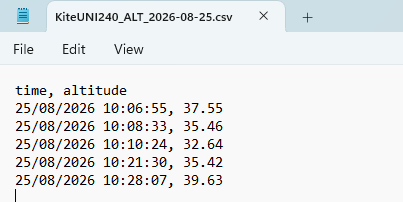
Altlog is a script for EdgeTX which logs ALT+ telemetry values on demand. Its main purpose is for logging the height of DLG launches, in conjuction with the DLG templates on this site.
The script is called via a special function. On each call, the script writes the value of ALT+ telemetry and a timestamp to a log file.
The log file is created in the /LOGS/ folder with filename {modelname}_ALT_[yyyy‑mm‑dd]. One log file per day.
Usage
Special function: switch={switch}, type=Lua script, value="altlog", repeat=1x
Installing the script
- Download and save as 'altlog.lua'.
- Copy the file to the /SCRIPTS/FUNCTIONS/ folder on the SD card/flash memory.
Logging launch height
This section describes the mod to the DLG and DLG6S templates, to log launch heights.
- Install the script
- Open the Special Functions menu
- Identify the SF with PlayVal, ALT+ (this is the SF which triggers the height announcement). Make a note of the logical switch (typically L26).
- Create a new SF to trigger the altlog.lua script, using the same logical switch you identified above.
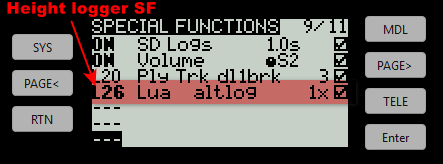
Now, the launch height will announced and logged simultaneously.
Other uses
Although designed to log ALT+ telemetry, the script can be easily modified to log any source value.
Authorship
The code was generated by Claude AI, but is human-validated and supported.
Download
altlog v1.2
Requirements
- Receiver or sensor with ALT telemetry
- Transmitter running EdgeTX 2.10 or later
Files
- altlog.lua - right click and Save as.