
List models
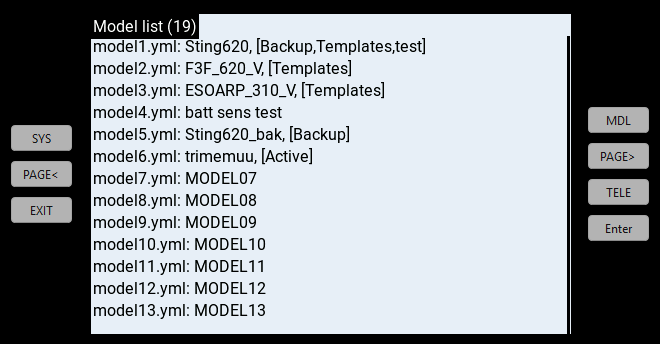
Description
List models is a Tool script to help manage your setups. It answers questions like "what is the YAML file corresponding to a model" and "which models have duplicate names and labels".
The script displays a list of all the YAML files in your transmitter, together with model names and labels. Each list entry is in the following format:
YAMLfile: ModelName, [Label1, Label2...]
Entries can be sorted by YAMLfile, ModelName or Labels.
Requirements
- Transmitter with colour screen
- EdgeTX
Installation
- Download lstmodels.lua v1.3 (right click, Save link as)
- Establish a USB connection between PC and transmitter
- Copy lstmodels.lua to the /SCRIPTS/TOOLS folder on the radio.
To run the script, go to the SYS > Tools menu and click on List models
Notes
Used in conjuction with ShowItAll (which displays the filename and labels of the active model), it can help resolve ambiguities resulting from EdgeTX's labelling system.